
AI has made everyone a “developer.” Not a software engineer, not a full-stack engineer... a developer. Someone who can take a business problem, describe it to Claude or Lovable or Bolt, and get a working application out the other side. The barrier to creation has effectively gone, and every enterprise platform team in the world is about to feel it.
The best AI-assisted coding tools already understand this, which is why they push hosting onto their own SaaS or PaaS. It’s the only way to keep the experience seamless end to end. And it works, right up until the app needs to talk to something inside your network. An internal database. An on-prem API. A system that lives behind the firewall and isn’t going anywhere. At that point the platform collapses, and the only path forward is a ticket to the platform team.
That platform team is already barely coping with day to day. We’ve had this conversation directly with large enterprise customers: the influx of AI-generated deployment requests, coming from people who have never touched infrastructure in their lives, is a real and growing problem with no clean answer. Buying an IDP that takes a year to configure before anyone can use it is not the answer. We know, because we’ve watched enterprises try that, and a year later the license is ticking and nothing is in production.
That’s the gap we built Portainer Run for.
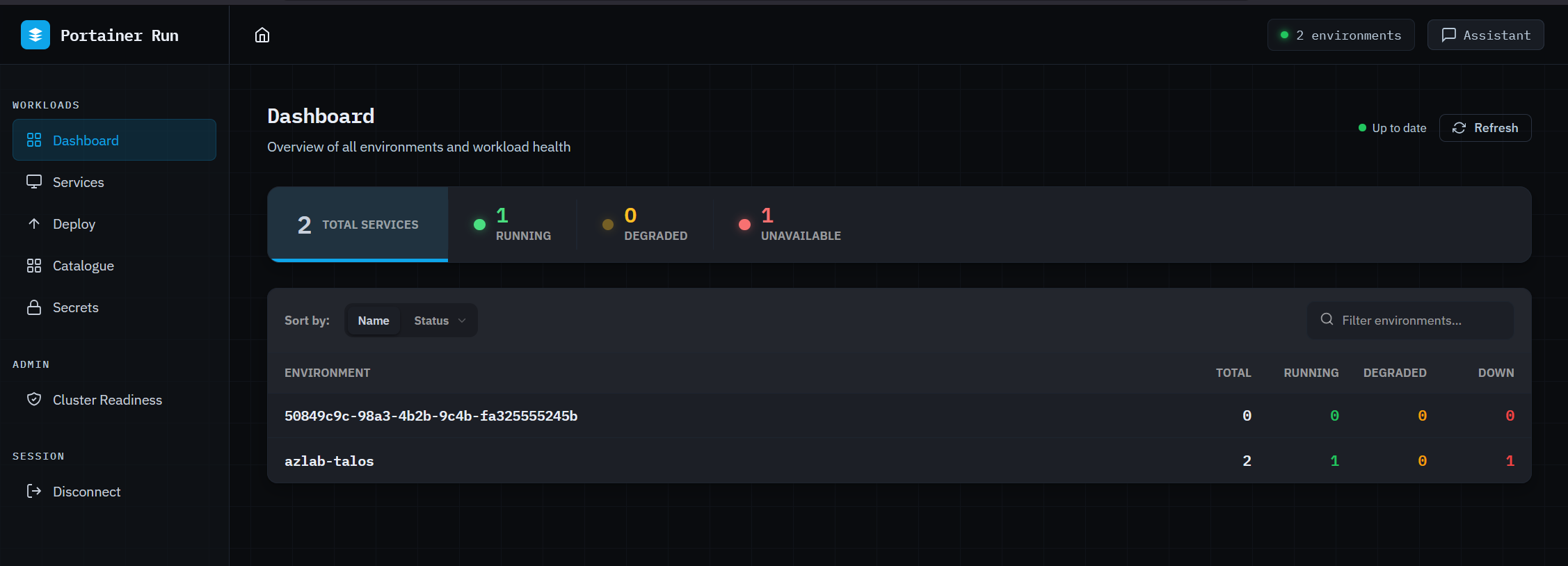
Portainer Run is a self-service container operations portal that sits on top of your existing Portainer deployment. You deploy it as a single container, point it at your Portainer instance, and your developers and app owners have a simplified operational interface governed entirely by Portainer’s existing RBAC and policy controls. The platform team’s role shifts from processing every deployment ticket to setting the rules once.
The interface is deliberately narrow in scope. It doesn’t replace Portainer. It surfaces one workflow (deploy, run, and operate a containerized workload) in the simplest interface we could build for it, for people who have no idea what a Pod is and shouldn’t need to.
The dashboard gives you a live health summary across all connected environments at a glance: total services, running, degraded, and unavailable, broken down per environment. On reconnect, the last known state is shown immediately while live data loads in the background, so the first thing you see is never a loading spinner.
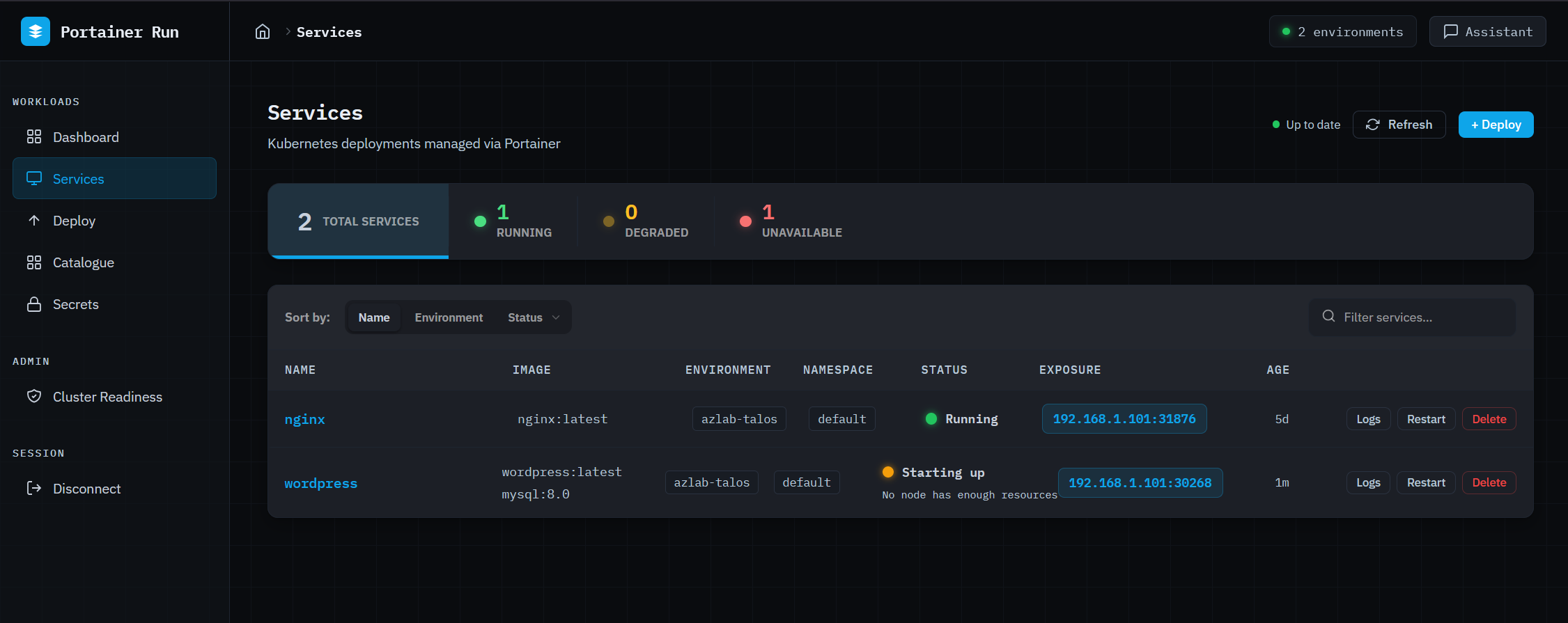
The services view is the primary operational HUD. Every running (scoped to the user) workload is listed with a traffic-light status indicator: green for running, pulsing amber for starting up or partially available, pulsing red for not running. Status reasons come from pod state and are surfaced in plain English below the indicator: “App keeps crashing (4 restarts)”, “Can’t download the image”, “No node has enough resources.” No kubectl required, no digging through events. The right information, in the right language, for the person who just wants to know if their app is working.
Clicking into a service opens a six-tab detail panel covering overview, containers, metrics (CPU and memory sparklines via metrics-server), logs, revision history, and a live edit view. The edit tab patches instance count, container images, environment variables, and exposed ports in a single save operation.
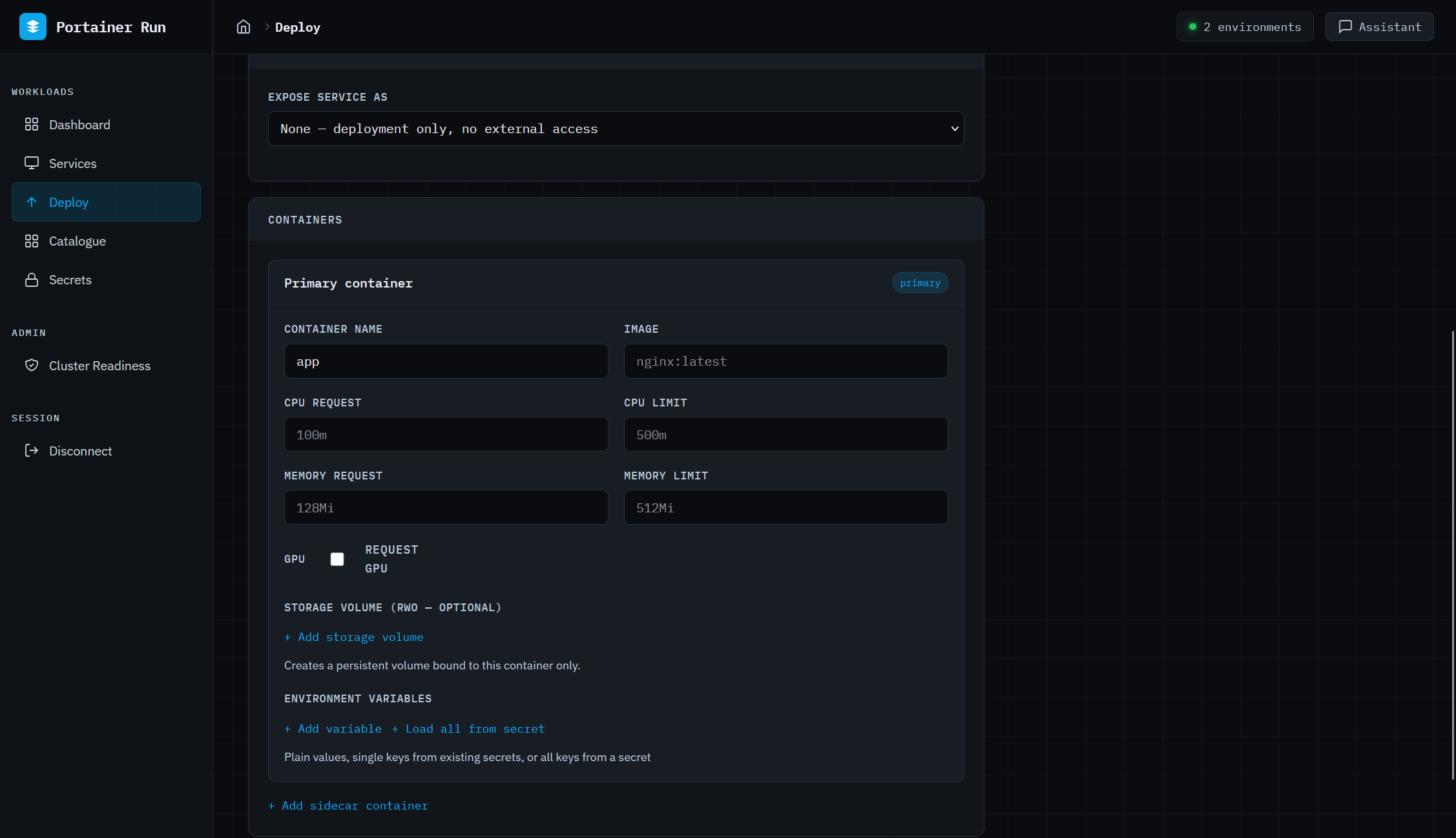
Deploy is a Cloud Run-style form that covers single and multi-container workloads, persistent storage, environment variables, Kubernetes Secrets references, resource limits including GPU, and service exposure. No YAML, no kubectl. The same open standard underpinning Google Cloud Run, surfaced as a form a business developer can actually use. GPU support auto-detects the resource type available on the target environment’s nodes (NVIDIA, AMD, Intel, Habana) and sets the correct resource key automatically, which matters as GPU workloads stop being exclusively the province of ML engineers.
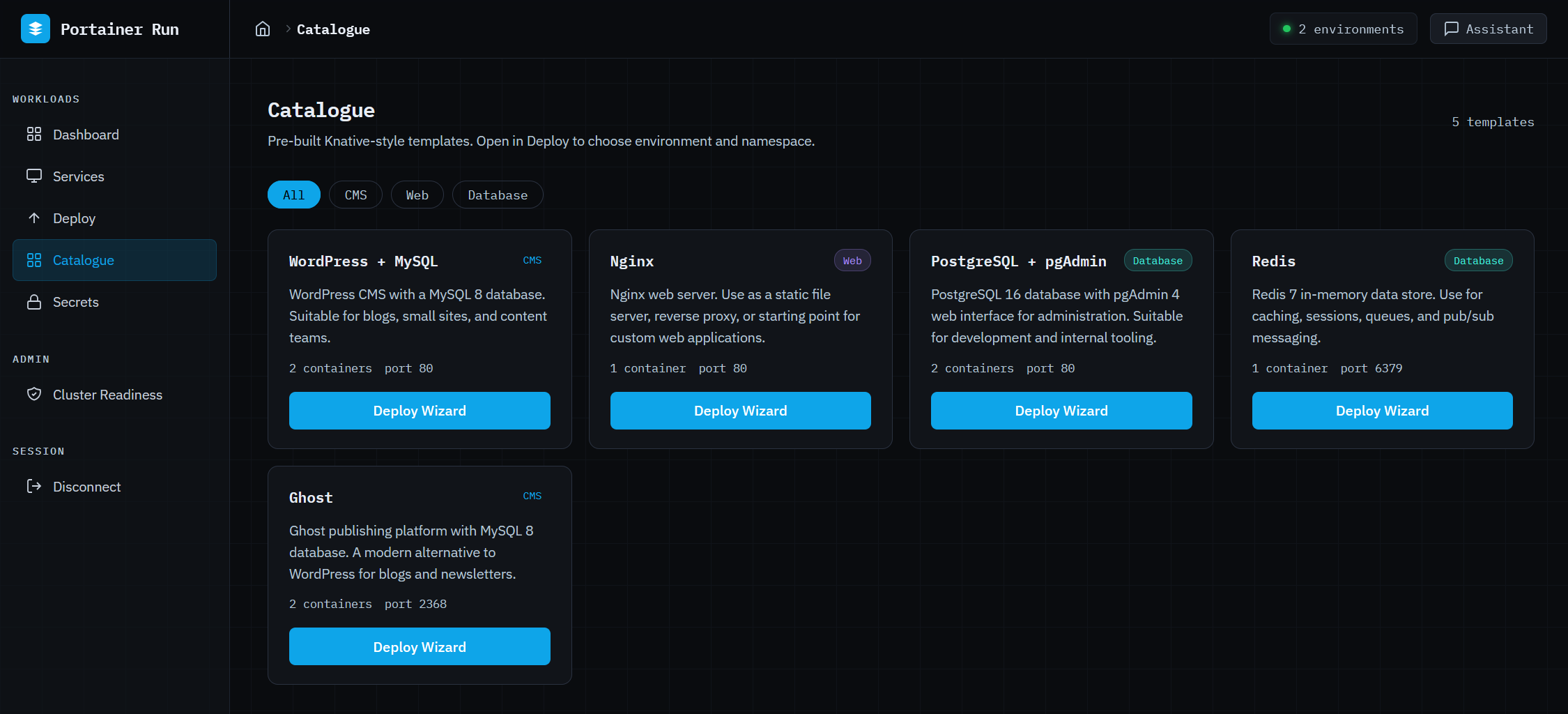
The Catalogue is a curated library of pre-configured application stacks. A two-step wizard selects the target environment and namespace, shows a confirmation summary, and fires the full deployment sequence in two clicks. Templates are fetched from a configurable URL (default uses one Portainer hosts, but you can use one you create and host) and cached server-side, the format is Knative Service manifest, and nothing is locked to a proprietary schema. The citizen developer who just wants to get something running finds what they need here.
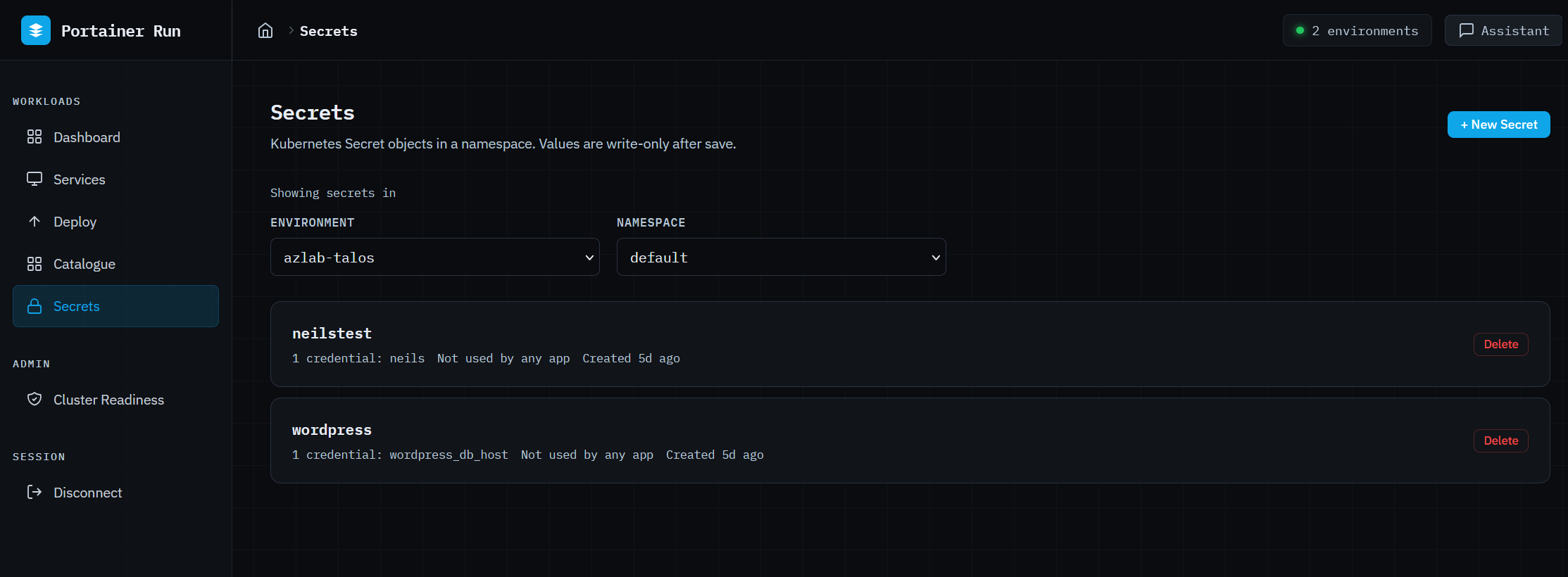
Secrets gives namespace-scoped access to Kubernetes Secrets without exposing the underlying cluster. Create with multiple key/value pairs (values are write-only and never displayed after saving), delete with confirmation, and see which apps reference each secret at a glance. Secrets created outside Portainer Run are fully referenceable, because that’s a normal operational requirement.
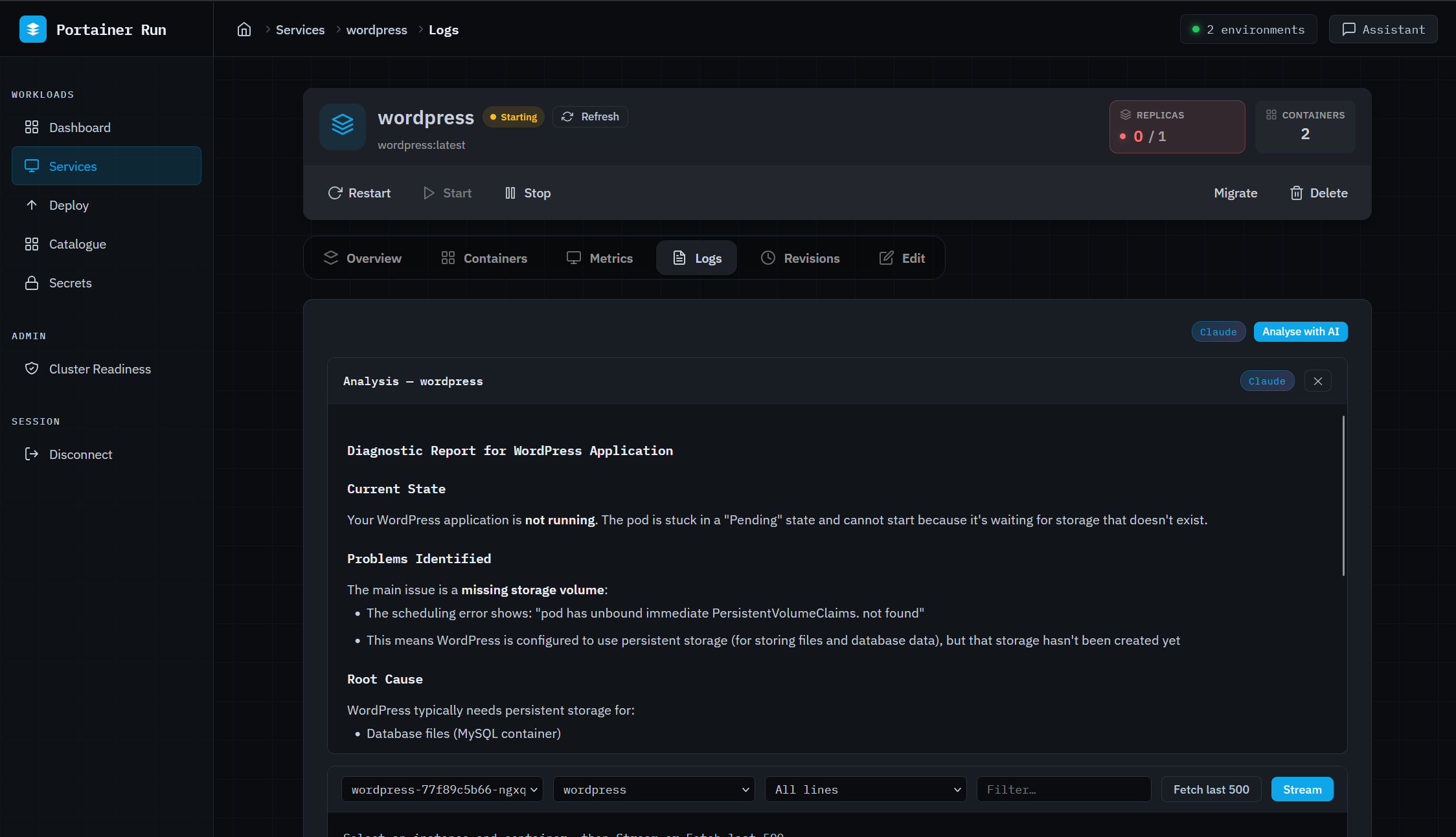
The Assistant is where the AI actually earns its place in this interface. It’s a persistent chat panel available on every page, context-aware of whatever you’re looking at (current page, open service, environment). When a business developer asks “why isn’t my app connecting to the database,” the Assistant proactively fetches logs, pod conditions, and Kubernetes events before generating a response. It doesn’t ask you to check them yourself. It covers failure modes where no logs exist yet (scheduling failures, image pull errors, resource constraints) because it reads from events rather than relying on application output. It can translate a Docker Compose file into a Portainer Run deployment, describe a workload in natural language to pre-populate the deploy form, and detect scale requests to open the Edit tab pre-filled. It never executes irreversible operations directly... those route to the existing UI.
The Assistant supports both Anthropic and OpenAI, server-side. The API key never reaches the browser, and the operator decides which provider is in use.
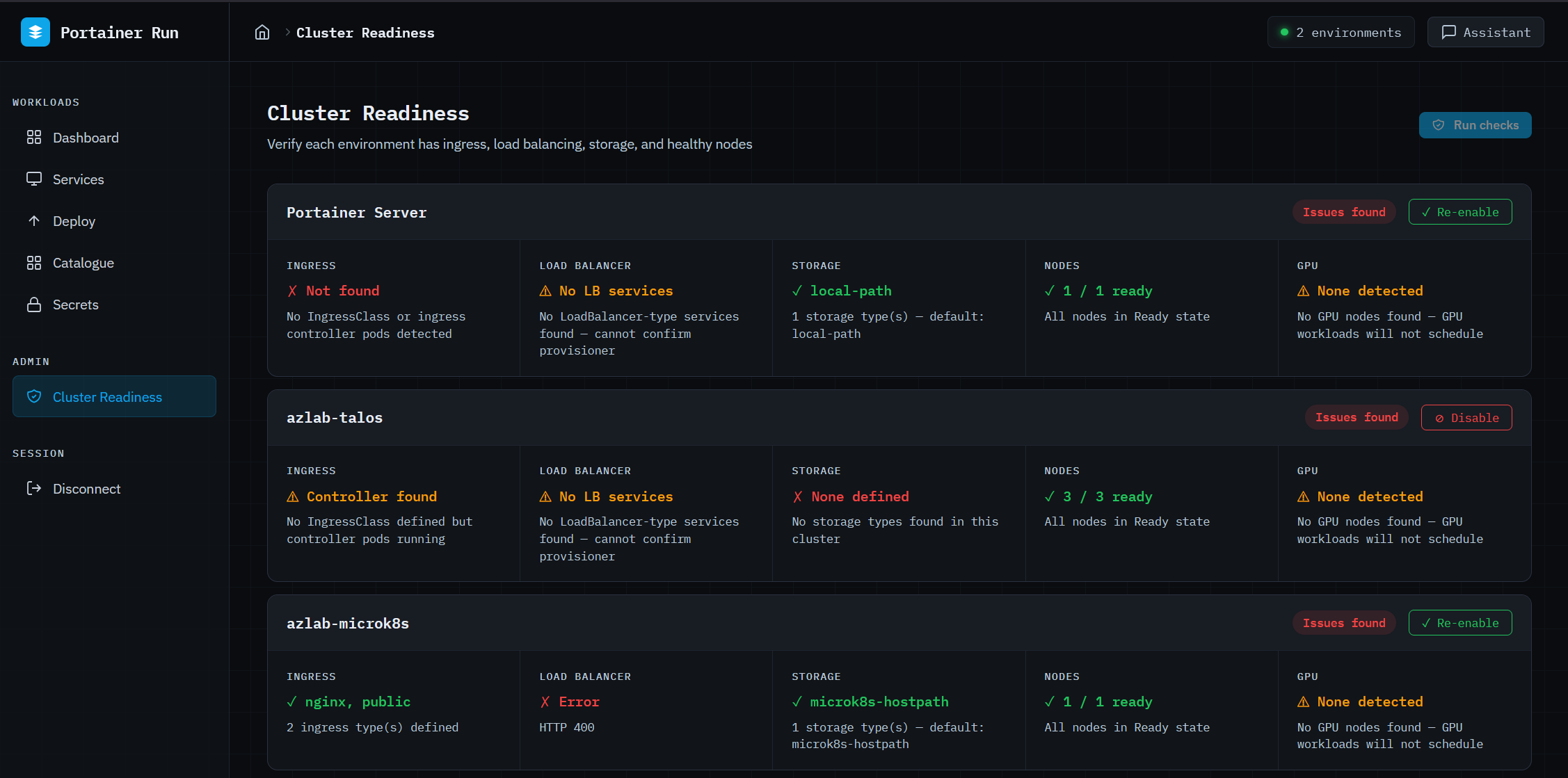
Cluster Readiness (admin only) checks each connected environment for ingress controller availability, LoadBalancer provisioning, storage class configuration, node health, and GPU node availability, and reports each result in plain English. Admins can disable environments from this view; disabled environments are hidden from all dropdowns and views for non-admin users and blocked from receiving new deployments for everyone. That’s the platform team’s control surface: decide which clusters are ready, and the guardrails apply everywhere automatically.
Portainer Run is not trying to serve the engineer who has full cluster access, a powerful AI agent, and deep API reach. The right answer for that persona is a Portainer MCP server, something that gives an agent access to the full Portainer API surface to do powerful, context-rich work within policy-controlled boundaries. That’s a product we’re building, and it’s a separate track. Dropping an agent with full cluster mutation rights into the hands of someone who vibe-coded their first app last Tuesday is a different problem with a different risk profile.
Portainer Run and a Portainer MCP server aren’t in conflict. They serve different points on the same spectrum. Citizen developer who needs a safe, simple path to get their AI-built app running inside the corporate environment, without overwhelming the platform team... that’s Portainer Run. Power user or agent that needs full API access, full context, and policy-controlled freedom to do complex infrastructure work... that’s the MCP server.
Portainer’s value in both cases is the same: we are the secure, policy-enforced gateway between the people and agents doing work and the infrastructure they’re working on. The interface on top of that gateway looks different depending on who’s using it. That’s the point.
Portainer Run is available now in the Skunkworks section of the Portainer website. Deploy instructions and the full template catalogue format are in the README on GitHub (github.com/portainer/portainer-run)